
What we do
Empowering Rural South Africa with Connectivity.
We specialise in providing robust, high-speed internet and VoIP services for farms and businesses in rural communities, with a strong focus on the Limpopo Waterberg district.
Leveraging a network of trusted partners, we seamlessly bring essential connectivity solutions to organizations throughout the entire country.
What we do
Empowering Rural South Africa with Connectivity.
We specialise in providing robust, high-speed internet and VoIP services for farms and businesses in rural communities, with a strong focus on the Limpopo Waterberg district.
Leveraging a network of trusted partners, we seamlessly bring essential connectivity solutions to organizations throughout the entire country.
Loading...

Approved Internet Speed Tests
If you suspect you might have bandwidth issues please use one of the
following verified speed tests.
If you suspect you might have bandwidth issues please use one of the following verified speed tests.
Approved Internet Speed Tests
If you suspect you might have bandwidth issues please use one of the following verified speed tests.
Consulting For Your Business
for custom quotes and network planning
Consulting For Your Business
for custom quotes and network planning
Frequently Ask Questions (FAQ)
We prioritize a highly stable and reliable connection for your home or business. We achieve this by utilizing a combination of Fixed Wireless, high-speed Microwave, and Fibre Optic technologies. This integrated approach, which includes installing a dedicated antenna dish aimed at one of our towers, allows us to deliver consistent broadband where other technologies may fall short.
A call-out fee is applied when a technician is required to visit your premises for an issue not caused by a failure in our equipment or network. This includes issues caused by tampering, negligence, or accidental damage to the client-side equipment. We are not liable for damages or loss of connection resulting from actions taken at the client’s site.
Try these common steps first:
1. Reboot Your Equipment: The best first step is the simplest! Unplug your router and the dish’s POE power supply (the black box) from the wall socket for 60 seconds, then plug them back in. This often resolves basic connectivity issues.
2. Check Background Activity:
• Disconnect Unused Devices to ensure updates or large downloads aren’t slowing down your entire network.
• Pause Windows Updates: Windows updates can consume significant bandwidth without your knowledge. To check the status, go to Start > Settings (gear icon) > Update & Security. Wait for the update to complete, or choose to pause it temporarily (not recommended for long-term security).
This indicates your router has likely defaulted to its factory settings. A temporary fix is to move the network cable that comes from the black POE (power) box to the router’s blue WAN port. You can then reconnect to the default Wi-Fi name and continue using the service.
Next Steps: Please contact our support team immediately. We can attempt to assist you by reconfiguring the router remotely or scheduling an on-site technician visit (call-out fees may apply if the cause is client-side).
Frequently Ask Questions (FAQ)
We prioritize a highly stable and reliable connection for your home or business. We achieve this by utilizing a combination of Fixed Wireless, high-speed Microwave, and Fibre Optic technologies. This integrated approach, which includes installing a dedicated antenna dish aimed at one of our towers, allows us to deliver consistent broadband where other technologies may fall short.
A call-out fee is applied when a technician is required to visit your premises for an issue not caused by a failure in our equipment or network. This includes issues caused by tampering, negligence, or accidental damage to the client-side equipment. We are not liable for damages or loss of connection resulting from actions taken at the client’s site.
Try these common steps first:
1. Reboot Your Equipment: The best first step is the simplest! Unplug your router and the dish’s POE power supply (the black box) from the wall socket for 60 seconds, then plug them back in. This often resolves basic connectivity issues.
2. Check Background Activity:
• Disconnect Unused Devices to ensure updates or large downloads aren’t slowing down your entire network.
• Pause Windows Updates: Windows updates can consume significant bandwidth without your knowledge. To check the status, go to Start > Settings (gear icon) > Update & Security. Wait for the update to complete, or choose to pause it temporarily (not recommended for long-term security).
This indicates your router has likely defaulted to its factory settings. A temporary fix is to move the network cable that comes from the black POE (power) box to the router’s blue WAN port. You can then reconnect to the default Wi-Fi name and continue using the service.
Next Steps: Please contact our support team immediately. We can attempt to assist you by reconfiguring the router remotely or scheduling an on-site technician visit (call-out fees may apply if the cause is client-side).
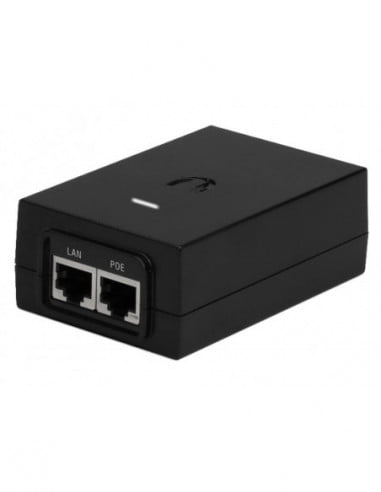
P.O.E. Safety And Information
- Always ensure that the white LED light is on to ensure connectivity.
- Never swop the LAN and P.O.E. cables on a P.O.E.
- The LAN cable plugging into the router should always be plugged in to the LAN port.
- The black network cable coming from outside should always plug into the P.O.E. port.
P.O.E. Safety And Information
- Always ensure that the white LED light is on to ensure connectivity.
- Never swop the LAN and P.O.E. cables on a P.O.E.
- The LAN cable plugging into the router should always be plugged in to the LAN port.
- The black network cable coming from outside should always plug into the P.O.E. port.